Home Pro FindersAdd listingSign in

Add your listing

What are you listing?

Pick the one that describes you. It decides the form you fill in, the page homeowners see and where you show up in search — so it is worth ten seconds.

Plan chosen: Premium — you will not be asked again.

  1. 1
    Choose a typeYou are here
  2. 2
    Pick a planPremium
  3. 3
    Build your listingOne form, in clear sections
  4. 4
    Preview & submitWe review it, then it goes live
Most pros choose this

Service Pro

Contractors and trades who do the work at the customer’s home.

7,839 listed here as Service Pro

  • Roofers
  • Plumbers
  • Electricians
  • Remodelers
  • HVAC
  • Landscapers
  • Cleaners

The wizard walks you through

  1. Details
  2. Contact
  3. Licenses
  4. Amenities
  5. Media
  6. Feedback

8 required fields · everything else is optional and can be added later.

Your page shows: Your trade, the towns you serve, your services and hours — shown to homeowners searching that trade where they live.


For individuals

Expert

One professional, listed under their own name and credentials.

  • Architects
  • Interior designers
  • Home inspectors
  • Engineers
  • Consultants

The wizard walks you through

  1. Profile
  2. Qualifications
  3. Services
  4. Feedback

5 required fields · everything else is optional and can be added later.

A place to visit

Business

Somewhere customers come to you: a showroom, a supply yard, a store.

  • Showrooms
  • Supply yards
  • Hardware stores
  • Design centers

The wizard walks you through

  1. Details
  2. Feedback

7 required fields · everything else is optional and can be added later.

Home shows & expos

Home Show or Event

A home show, expo or open house that homeowners can walk into — booths, demos and pros in one place.

1 listed here as Home Show or Event

  • Home & garden shows
  • Remodeling expos
  • Parade of homes
  • Open houses
  • Workshops

The wizard walks you through

  1. Details
  2. Feedback

7 required fields · everything else is optional and can be added later.

Not sure? If you do the work at your customer’s home, you are a Service Pro. Already on Home Pro Finders? Find and claim your listing instead — it is free.
Questions?
Image Clarity

Logos should be no smaller than 160 x 160 px, with the subject matter centered as possible to avoid being cut off at the edges.

Image Size Limits

Images can have a maximum file size of 1 MB. Should you need to compress your images, no problem! Here’s a free tool with super simple instructions.

  1. Open Squoosh.
  2. Upload an image.
  3. Choose WebP from the dropdown.
  4. Download your optimized image.
Image Clarity

Headshot (Listing Preview) images should be no smaller than 800 x 900 px and Headshot (Listing Page) images should be no smaller than 160 x 160 px, with the subject matter centered as possible to avoid being cut off at the edges.

Image Size Limits

Images can have a maximum file size of 1 MB. Should you need to compress your images, no problem! Here’s a free tool with super simple instructions.

  1. Open Squoosh.
  2. Upload an image.
  3. Choose WebP from the dropdown.
  4. Download your optimized image.
Easily Display your Google Reviews with these simple steps.
  1. From your EmbedSocial dashboard, click the ‘+’ icon next to the ‘Sources’ menu item.
  2. Choose ‘Google.’
  3. Click ‘Connect Google Account.’
  4. Authenticate with Google using the credentials tied to the account where your Google Reviews are coming from.
  5. After authentication is successful, click ‘Create Widget.’
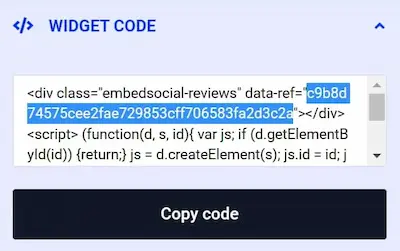
  6. Copy the unique identifier from the Widget Code, as shown in the image below, highlighted in blue.
  7. Edit your Listing and paste the code into the ‘Google Reviews’ field.
  8. Save changes.
Image Clarity

Cover and Gallery images should be no smaller than 1920 x 1080 px for the best clarity, and the subject matter should be as centered as possible to avoid being cut off at the edges.

Image Size Limits

Images can have a maximum file size of 1 MB. Should you need to compress your images, no problem! Here’s a free tool with super simple instructions.

  1. Open Squoosh.
  2. Upload an image.
  3. Choose WebP from the dropdown.
  4. Download your optimized image.
Add Listing

Wondering if you already have a Listing on our platform? Click here to find out.

Claim Listing

Find and take control of any Listings you have on our platform. No Listing to Claim? Click here to add one.